A workout tracker for iPhone

Every rep,
on record.

Log every set in seconds, with last time's numbers beside it. Plan the week, then watch the record turn into progress.

Explore the app Made for iPhone
Coming soon
  1. Bench press · set 180 kg × 8
  2. Bench press · set 280 kg × 8
  3. Bench press · set 382.5 kg × 6
LAST TIME, BESIDE EVERY SET
A recording of Zorila with demo data in four chapters. Plan: the Push template is opened and started. Train: the first bench press sets are filled from last time, the rest timer runs down, and the last set is filled from last time's 120 kg for 6, then raised to 8 reps. Record: the exercise analytics scroll through personal records and comparisons, then the workout is finished and logged, with a 5-day streak. Progress: the Profile dashboard scrolls through the training heatmap, goals, and recent personal records, led by today's bench press.
Thoughtfully built for iPhoneStrength & cardioYour routine, organisedProgress you can see

LESS TYPING. MORE LIFTING.

Made for the work
you put in.

Plan your week, reuse your previous sets and follow your progress. Keep the details in Zorila. Keep your head in the session.

Zorila training templates for a Push, Pull and Legs programme, with scheduled training days

Less planning at the gym. More training.

01 / PREPARE

Your routine, ready when you are.

Save your favourite workouts as templates, or start with a training programme. Pick your exercises and training days, then start your next session without rebuilding your routine.

  • Keep your favourite workouts ready to go.
  • Organise templates into training programmes.
  • Schedule sessions around your week.
A look inside the app · Demo workouts
Zorila bench press workout with three completed sets and previous weights and reps visible

Your next set, without the guesswork.

02 / TRAIN

Your last workout, one tap away.

Tap “Last” beside a set to fill in the weight and reps from your previous session. Keep them or adjust for today, with less typing between sets.

  • See your previous sets beside today’s workout.
  • Mark each set complete as you go.
  • Optionally start your rest timer as you complete a set.
A look inside the app · Demo workouts
Zorila exercise charts showing max weight progression, session volume and estimated one-rep max

The bigger picture, one workout at a time.

03 / UNDERSTAND

See your strength grow.

Follow each exercise across the weeks and months. See your personal records alongside charts of your maximum weight, session volume and estimated one-rep max.

  • See how your heaviest sets progress over time.
  • Compare the volume of each session.
  • Follow your estimated one-rep max.
A look inside the app · Demo workouts
Barbell Bench Press charts showing max weight, session volume and estimated one-rep max over six months of demo workoutsA clearer picture of your training.

03 / PROGRESS

Small steps.
Stronger you.

See what your effort adds up to. Follow each exercise over time with clear charts built from the sessions you log.

  • ◎
    Watch your best lift grow

    See your max weight progression for each exercise.

  • ▦
    Every session in perspective

    Compare session volume and see how much work you’re putting in.

  • ↗
    Your strength, over time

    Follow your estimated one-rep max as your training progresses.
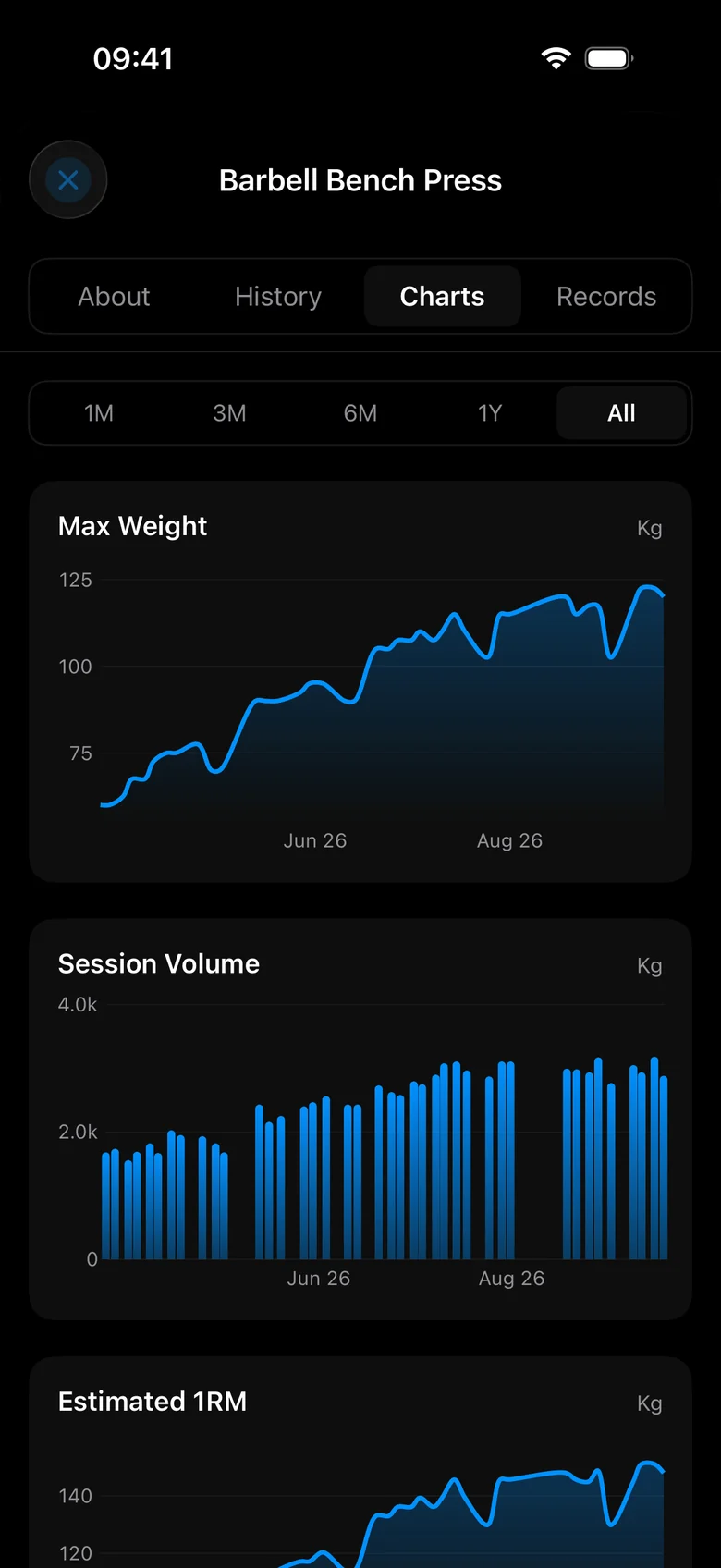
Max Weight chart from the app, showing bench press progression across six months of demo workouts
Your max weight progression, at a glance.

04 / YOUR DASHBOARD

Your progress.
Your way.

Choose the widgets that matter to you and arrange your dashboard around them. Follow your consistency with a training heatmap, revisit personal bests or see your weekly sets by muscle group.

Add, remove and reorder widgets as your training changes.
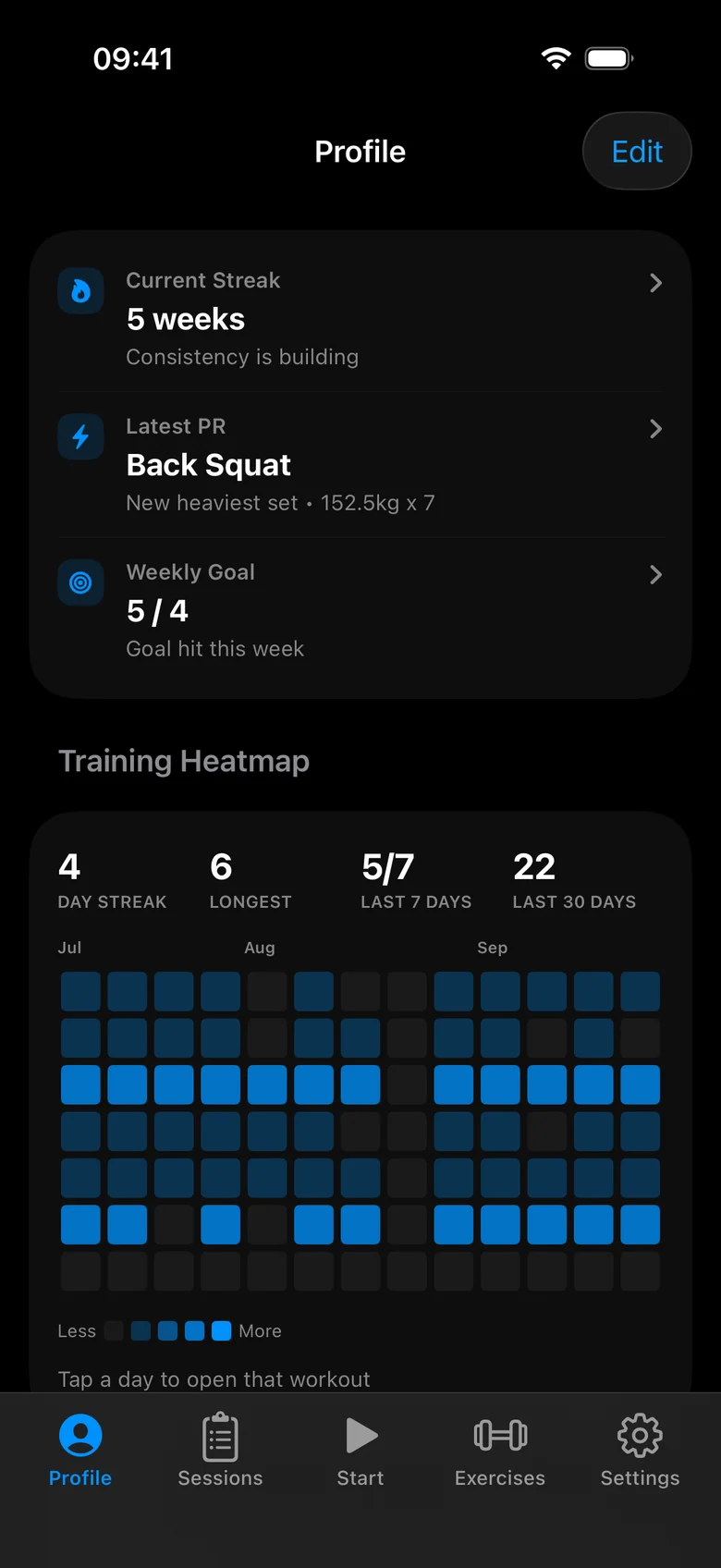
Zorila Profile dashboard with streak, PR and weekly goal highlights above the Training Heatmap, showing workout days and streaks from demo workouts
Your training, at a glance. Shown with demo data.

BUILT FOR REAL WORKOUTS

Nothing gets lost.

01 / PICK UP

Pick up where
you left off.

App closed mid-session? Reopen your unfinished workout with entered weights, reps and completed sets retained.

Your sets. Your reps. Still here.

02 / KEEP GOING

Keep training offline.

Poor reception doesn’t stop your session. Log on your phone and sync pending changes when you’re connected again.

03 / RESET

Finish a set.
Start your rest.

Let your rest timer start when you complete a set. Choose your rest period and adjust it as you go.

COMING SOON TO IPHONE

Start the record
you’ll be glad you kept.

Every set, every session, every personal best.
Kept by Zorila, coming soon to iPhone.

Explore the app A few questions first? →

Inside Zorila